Build a combo
What it's for
A combo bundles several dishes into one priced deal — a thali, a lunch box, a meal-for-two. Combos can have fixed items and "pick one" choices, and once published they sell as a single tap on the POS.
Where to find it
From the Menu page, choose the 🍱 Combos
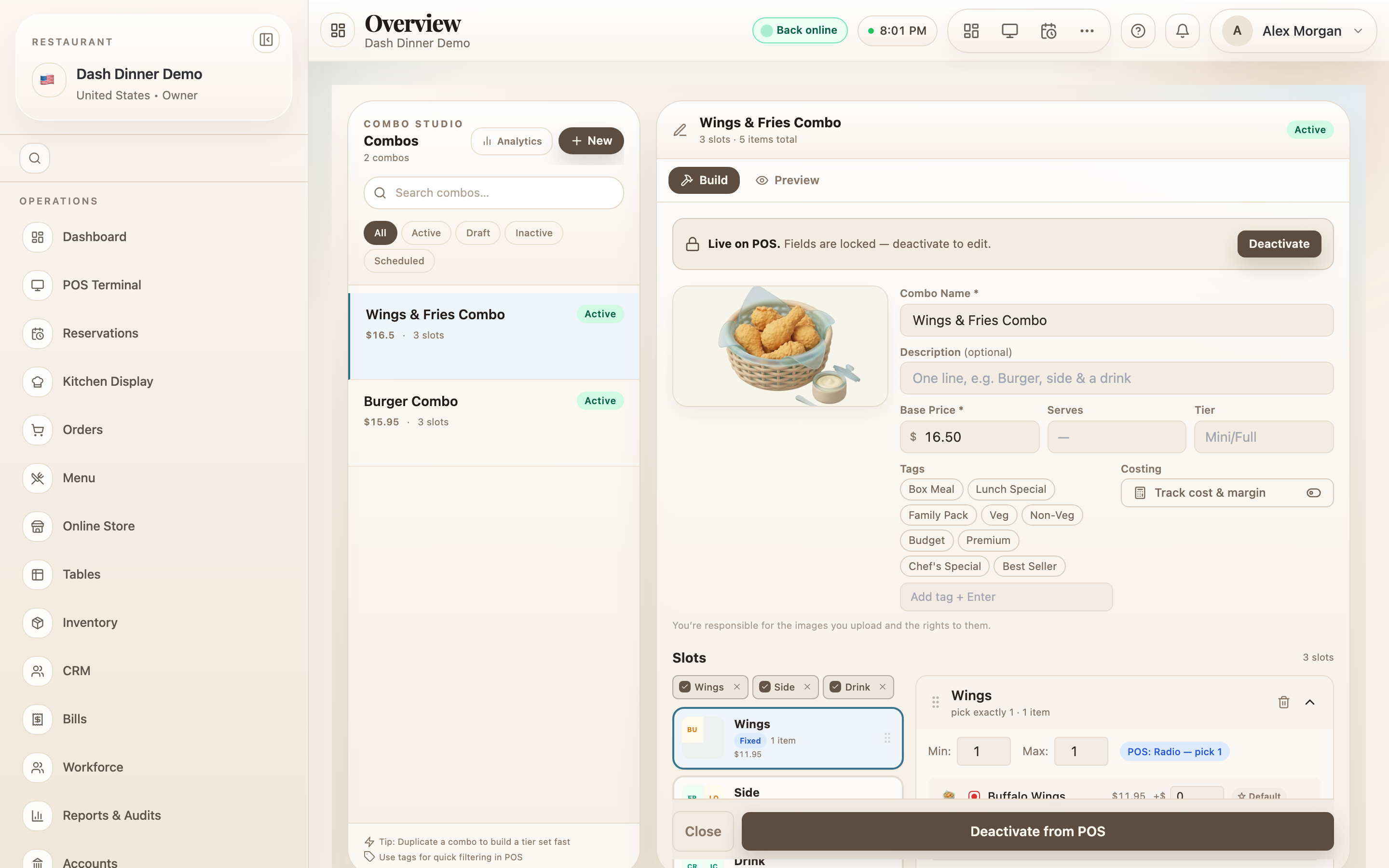
chip. This opens the combo builder (route /combos), laid out as your combo library on the
left and the editor on the right, with Build and
Preview tabs.
Create a combo
- In the library toolbar, choose New. A blank combo appears, named New Combo.
- Fill in the identity fields:
- Combo Name * — e.g. Full Thali or Lunch Special.
- a short receipt/kitchen name, and a one-line description.
- Base Price * — what the combo sells for.
- Serves and Tier (e.g. Mini / Full) if relevant.
- Add a cover image — hover the cover box and choose Add cover, then Reposition cover and Use This Crop to frame it.
Add the dishes — "Slots"
A combo is built from Slots — each slot is a part of the meal.
- Under Slots, add a slot from the presets — Main, Sides, Drink, Dessert, Add-on — or choose Custom… to name your own.
- Set how many items the slot includes. A fixed slot always includes its dish; a choice slot lets the guest pick (e.g. "choose 1 of 3 drinks").
- Add dishes to the slot by searching "Search dishes…" and clicking them in.
Publish
The builder shows a readiness checklist. When it passes, you'll see "Ready — hit Publish to POS to make it live." Then use the footer:
- Save Draft — keep working on it later.
- Publish to POS — make it live and sellable.
- Clear — start over.
A live combo is locked so its price and contents can't change by accident. To edit a published combo, choose Deactivate first, make your changes, and publish again.
Worked example
A ₹199 lunch box. Choose New, name it Lunch Box, set Base Price * to 199. Add a fixed Main slot with Dal Rice, a choice Sides slot ("pick 1" of two curries), and a Drink slot with a soft drink. Add a cover photo, then Publish to POS. Staff can now add the whole box with one tap.
Tips & things to watch
- ✅ Use choice slots to offer variety without creating many separate combos.
- ✅ Add a cover image — combos with a photo stand out on the POS and self-order menus.
- ⚠️ Deactivate to edit. A live combo is intentionally frozen; you can't change it until you deactivate it.