The reservations calendar
What it's for
Reservations is where you manage bookings — see who's coming and when, take new bookings, and move each party through the evening from confirmed to seated to done.
Where to find it
- Web
- iOS
- Android
Choose Reservations in the left sidebar (route /booking).
Open Reservations from the app.
Open Reservations from the app.
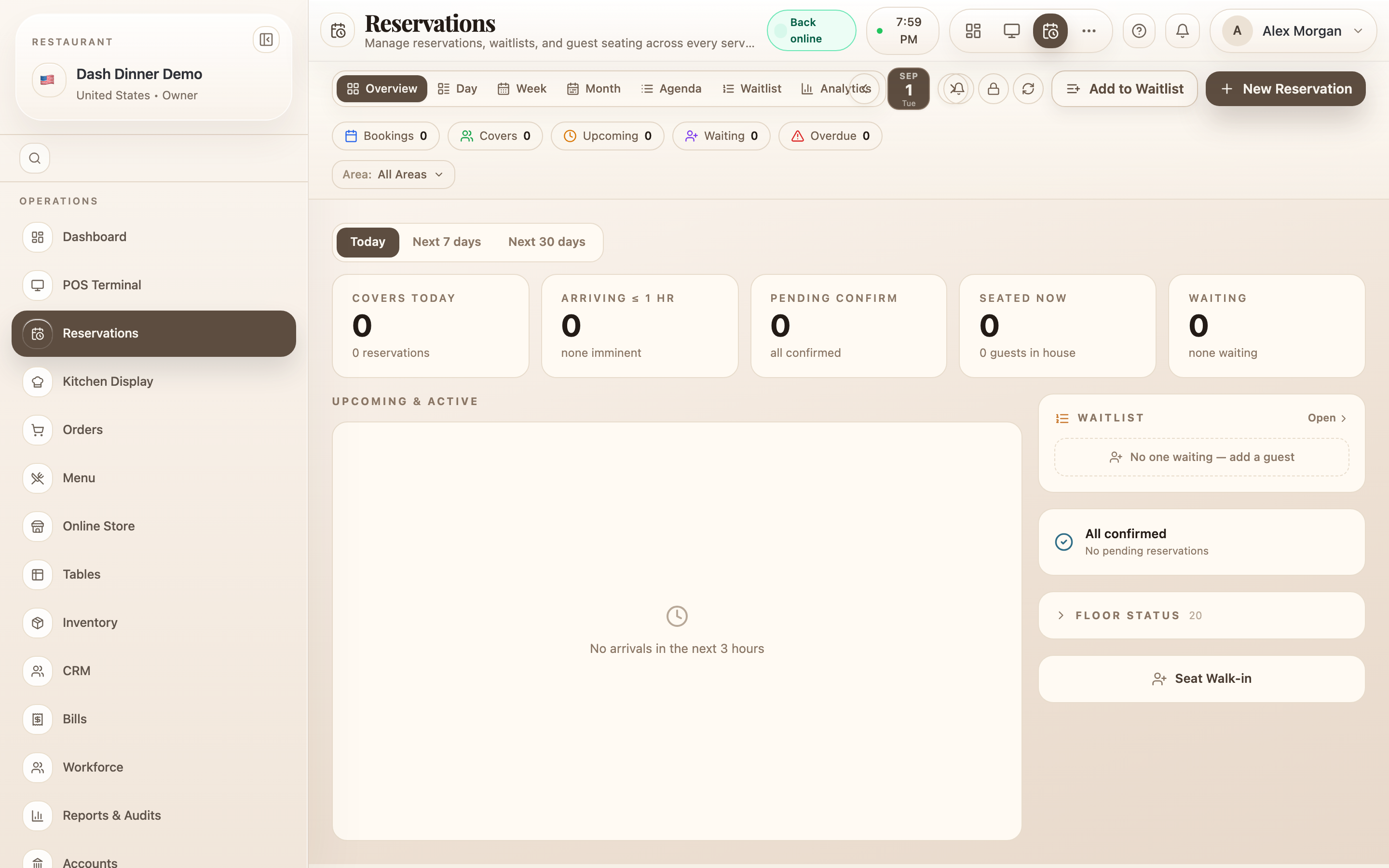
Choosing a view
A tab group at the top switches how you look at bookings: Overview, Day, Week, Month, Agenda, Waitlist, and Analytics. Overview is the service view — the best place to run the evening; Day is a timeline of the day's tables.
Move through dates with the prev/next chevrons, or click the date button to open a calendar and jump to any day (it highlights when you're on today).
The day at a glance
A row of summary chips sits under the header, each also a filter: Bookings, Covers, Upcoming, Waiting, and Overdue.
In Overview you also get service cards — Covers today, Arriving ≤ 1 hr, Pending confirm, Seated now, Waiting — and a horizon toggle for Today, Next 7 days, or Next 30 days.
Filters and quick tools
- Filters (in the calendar views): Area: (default All Areas) and Status: (default All).
- Top-right icons: Notifications, Table blocks (see Manage reservations), and Refresh.